DailyMobileDown.Blogspot.com
Showing posts with label Pocket PC Applications. Show all posts

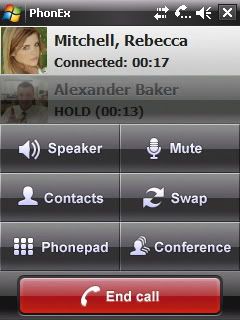
Iconsoft Phone Extension (PhonEx) v2.0-ShareFree WM5, WM6.X


Iconsoft Phone Extension (PhonEx) v2.0-ShareFree
Requirements:
* Windows Mobile 5/6.x
The Iconsoft Phone Extension or PhonEx is a new generation program implementing a new type of user interface for managing the main functions of a telephone, built on the basis of the Iconsoft Mobile Engine. PhonEx opens up new possibilities for easy interaction using simple touch, without the stylus, while retaining all the capabilities of a Windows Mobile palmtop computer.
Here are some key features of "Iconsoft Phone Extension (PhonEx)":
* Convenient and intuitive interface
* Interaction using simple touch (without stylus)
* Today plug-in
* Address book
* Photo contacts (including SIM contacts)
* Individual tune for calls (including SIM contacts)
* Expanded call history for each contact
* Image library
* Favorites group
* Full-screen incoming call
* Full-screen Dialer
* New and easy Phonepad
* Convenient contact search
* Personalization
* Broad options capability
* and much more!


READ MORE AND DOWNLOAD

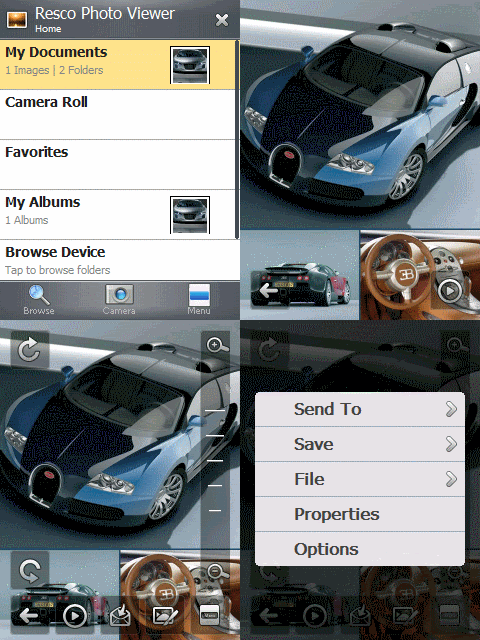
Resco Photo Viewer v7.00 Beta 3 WM5/WM6.1


Resco Photo Viewer 7.00 Beta 3
Requirements: WM5-WM6.1
Overview: The new Beta version of the Photo Viewer was released.
What was fixed:
* Audio Slideshow
* Exif and IPTC tags
* About dialogue is added
* Facebook connection
* Enlarge small images in Settings
* Favorites are remembered
* Buttons for next previos image in fulscreen
* Thumbnail view bugs
* GPS location viewing and saving
* Select All button was added to the File Association
* G-sensor handled actions are correct
* Toolbar icon's text are moved a bit lower
* Camera starts with its highest resolution
* Animated Gifs are played automatically and in loop
And few more settings requested by Beta testers are added and many of the Bugs were fixed
Things that are not (or fully) functional:
* Create Album
* Save Picture As
* Save Notes to Exif
* Drawing
More Info:
http://www.resco.net/forums/ShowPost.aspx?PostID=27265


READ MORE AND DOWNLOAD

Spb Radio v.1.0.1 Build.2191 Public Beta WM5/WM6


Spb Radio v.1.0.1 build.2191 Public Beta
Requirements: WM5/WM6
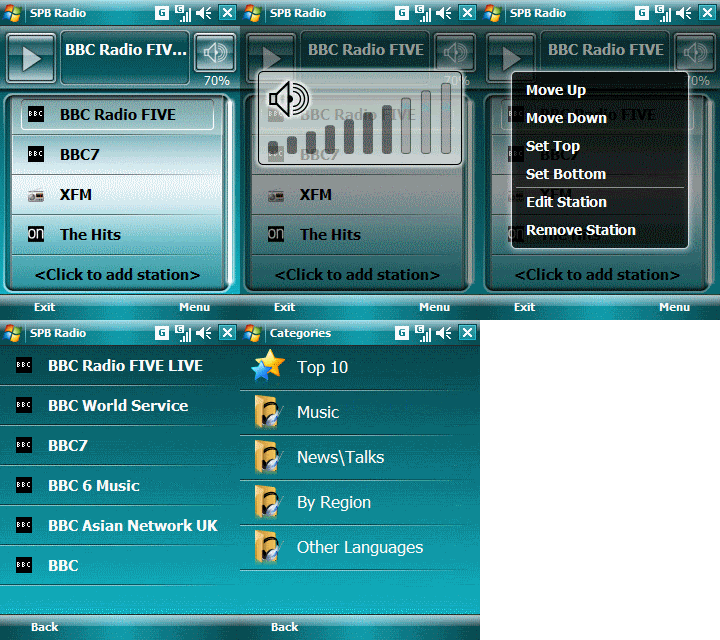
Overview: A high-quality Internet radio player for Windows Phones, which gives subscription-free access to an unlimited number of live streaming radio stations from all over the world.
Radio Stations
Radio stations from all over the world
* Built in radio stations catalog with 1500+ stations
* Favorites
* All countries, all genres
* Custom stations
* Station search
Streaming
Real time radio streaming
* Real time radio streaming
* Bitrate indicator
* Support for EDGE connection
User Interface and Experience
* Touch-oriented user interface
* Kinetic scrolling
* Screen turn off
* On-screen volume control
* Adaptive skins
This update adress some crashes, hangs and miscompatibility with some devices.


READ MORE AND DOWNLOAD

Spb News v.2.0.1 Build.3461 Public Beta WM5/WM6.1


Spb News v.2.0.1 Build.3461 Public Beta
Requirements: WM5-6.1
Overview: Spb News is a news reading Pocket PC program that gives a rich offline experience along with an easy interface and full RSS/Atom support. With Spb News you'll always have all the latest information, right in your pocket, with images and whole articles, yet fully optimized for small screen viewing
Channels
Full Website News
* Full RSS/Atom support (0.9x, 1.0, 2.0)
* Categorized multilingual online channel catalog
* Easy custom channel adding
* Channels search
Articles 
Full Text Articles
* Offline reading with images, text formatting and links
* Article thumbnails
* Automatic cleanup
* Adjustable fonts
User Interface and Experience
Full Text News Reader
* Touch-oriented user interface
* Gestures to switch between articles
* Kinetic scrolling
* Smart scrolling in articles
* Automatic update
* %No desktop component needed – just an Internet connection
Version 2.0.1 (September 18, 2009):
* Better work of automatic/scheduled update
* Improved kinetic scrolling in lists
* Better scrolling in HTML: per page scrolling with long gesture, more smooth
* Resolved lot issues with some devices, like support for hardware keys\etc
* Lot of other fixes.
More Info:
http://www.spbsoftwarehouse.com/pocketpc-software/news/


READ MORE AND DOWNLOAD

VITO Winterface v2.0 WM5/WM6


VITO Winterface v.2.0
Requirements: WM5/WM6
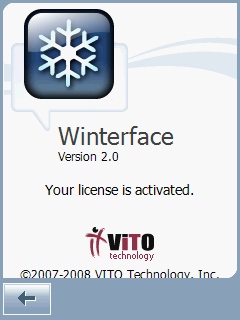
Overview: Vito Technology recently announced that their popular Winterface user interface was about to receive a major upgrade.
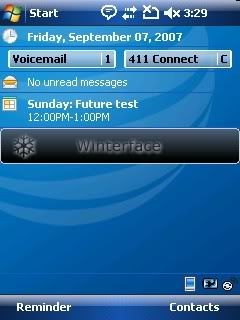
Winterface is light and efficient because my phone was flying with Winterface 2.0 running. Going from page to page within Winterface requires a swipe and it was amazingly responsive. In fact, I’m sure we’ve all tried to put our finger on the screen and see how far behind our finger the screen moves…well with Winterface 2 there’s no lag so even between screens everything moves in real time, which I can’t say about TF3D. It really makes the interface feel smooth and enjoyable. As I sit here and flick through 6 screens I’m still shocked how fast it goes. You should also know that Winterface 2 can be integrated into your current interface, so it can be a plugin on your standard Today screen or you can just make a shortcut to it to launch it. If you run it as a plugin then just tap it and it’s full screen with zero delay…not a flicker. It’s also very highly customizable and entirely finger friendly so no need to use the stylus at all.
But that’s enough talking, let’s get to some screenshots already so you can see it in action:
Here’s the two line today plugin which is large enough so there’s no missing it. Wow, I haven’t used this phone since 2007
One of the improvements to Winterface 2 was the addition of skins. So you can see various skins which change the icon style, layout and size. I’ve grown fond of the Google skin personally
As you can see, some of the icons have built in notifications, like the Tasks and Calendar icons. Tapping the calendar brings up a custom popup.
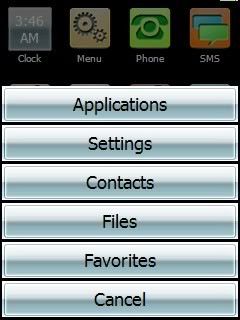
You also get to add programs, settings, files, contacts and even direct links to webpages so you can quickly launch any of these with a single press. To move icons you just tap and hold on the screen until the icons ‘shake’ and then you can delete them,rename them or drag them around to where you want them to go. Obviously, you can make a full page of speed dials, a dedicated app page or mix and match as you feel.
If you add a contact to Winterface you are treated with another custom screen. From here you can quickly dial the contact, email them or send them a text message. Again, it looks great and is very intuitive.
The customization continues with the ability to add your own background and to toggle the program names (removing them gives you room to add an extra line of shortcuts as well).
Another nice screen is the profile page which lets you toggle the ringer with a finger friendly interface. The screen icon changes depending on the profile you choose so you can see the set profile without pressing it.
Several other icons are also ‘active’ icons like bluetooth status (which toggles bluetooth on/off )and when pressed the icon changes accordingly. The battery, clock and memory icons are also active icons that provide you with real-time information.
If you’re using a phone with a slideout keyboard then the icons will rearrange themselves when you slide it out and you get a bit of animation to go along with it. it’s all very smooth and even on my old Hermes, Winterface will rearrange the icons faster than you can rotate the phone.
Another custom screen is the ‘running’ screen which is a task manager. From here you can toggle between programs or kill all or some active apps.
So there we have it. Extremely finger friendly, fast and customizable. Again, this was a pre-release so you can expect a more thorough review when a final version is available and we’ll be sure to tell you when the final version is available for download. This should be enough to get your mouth watering for now though
And if you already have Winterface then this will be a free upgrade. That’s some serious customer appreciation
More Info:
http://iwindowsmobile.ru/vito-mobile-shell.html


READ MORE AND DOWNLOAD

PeraProfiler v1.0 WM2003/WM5/WM6


PeraProfiler v1.0 WM2003/WM5/WM6
Requires Windows Mobile 5/6, QVGA screen only (VGA not supported), and must be a touchscreen device (smartphones not supported)
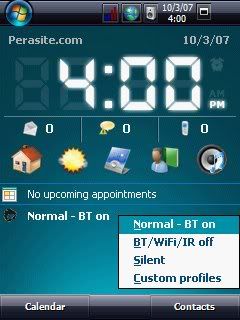
Overview:PeraProfiler is a Today screen profile changer. Click on the plugin to select the profile you'd like to use
NOTE: THIS PLUGIN MUST BE INSTALLED TO YOUR DEVICE, NOT A STORAGE CARD!
Copy PeraProfiler_v1.1.5.cab to your device (via ActiveSync or another method of your choosing.)
Open your favorite File Explorer program and navigate to the directory you stored the .cab file in.
Click (or double-click) the .cab file to begin installation
History
v1.1.5
Bug fixes
v1.1
Upgraded to newest version of MortScript
Fix - if you don't have MortScript installed, you should no longer have to run a seperate install for that before PeraCount works
Added uninstall script that should clear out more of the leftovers if you uninstall
Fixed icon so that it will show properly when PeraProfiler is loaded
Fixed possible installation problem where it installed to wrong directory
v1.0
Today screen profile changer. Click on the plugin to select the profile you'd like to use.
You can also navigate to the plugin using your d-pad and then make your selection using left and right on your d-pad.
The custom profiles selection allows you to create up to two custom profiles which will then be available to the today screen plugin.
When creating a custom profile, you will have the option of turning on or off the following:
Bluetooth, WiFi, Infrared beams, and Cellular Data connection in addition to setting your desired volume.
The default profiles are:
Normal - BT on: Volume is at maximum and Bluetooth is turned on. All other items remain in their previous state.
BT/WiFi/IR off: Bluetooth, WiFi and Infrared beams are turned off. Volume remains unchanged from it's previous state.
Silent: Volume is muted. All other items remain in their previous state.
More info:http://www.perasite.com/viewtopic.php?t=10


READ MORE AND DOWNLOAD

Reperion Basic v1.52 WM2003/WM5/WM6

Reperion Basic v1.52 WM2003/WM5/WM6
Requirements:WM2003/WM5/WM6
Overview:Reperion Basic is application that brings you instant live GPS Tracking in Google Earth, Virtual Earth and Google Maps. Please read readme file and make registration.
More info:http://www.reperion.com/products/basic.htm


READ MORE AND DOWNLOAD
eXTReMe Tracker