DailyMobileDown.Blogspot.com
Showing posts with label Pocket Pc. Show all posts

Sw swCalc v1.0.1 XScale WM2003 WM5 WM6


Sw swCalc v1.0.1XScale WM2003 WM5 WM6 Incl
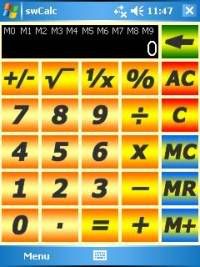
swCalc is a simple calculator with 10 memories for Pocket PC. It possess big buttons for easily pressing by your finger. It was designed to replace the original calculator come with Windows Mobile.
Functions & Conversions:
Complete Scientific function set
Trigonometry functions including Inverse, Hyperbolic, & Inverse Hyperbolic
Full Deg/Rad/Grad conversions
Decimal Degrees conversions


READ MORE AND DOWNLOAD

xRay v3.0 (X-Ray) PPC WM6


xRay v3.0 (X-Ray)
Requirements: PPC WM6 - look comments
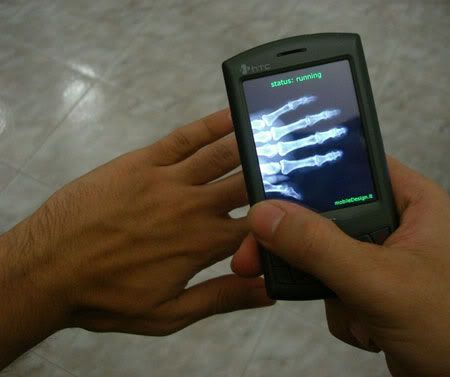
Overview: xRay is a joke you can use to make your friends laugh. Using X-ray is incredibly simple! Just start the program, and while it runs, slide your mobile over your hand, following the movement of the hand on the screen. If you practice a bit this will give really funny results
Video:http://www.youtube.com/v/c0YsQFgN3jc&hl=pt-br&fs=1


READ MORE AND DOWNLOAD

Contacts Search v1.2 WM2003 WM5 WM6


Contacts Search v1.2
Requirements:
-Windows Mobile 5/6.x
-.NET Compact Framework 2.0
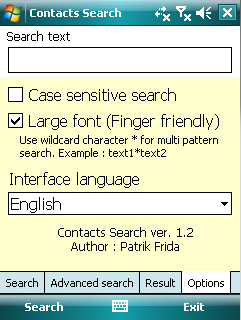
This application allows to perform fulltext searching in contacts. It supports multi pattern search and 'Case sensitive search'. Optional large font option (finger friendly) and Scroll results with finger.
You can search in contacts the following information:
* Full name
* Full home address
* Full work address
* All contact phone numbers
* All contact emails
* All contact IM address and Nickname
* Contact Body
* Company and Job title
* Categories
* Department
* Children
* Manager
* Assistant Name and Phone
* Web page (Only valid URL are supported - valid URL contains http://)
Application shows all found contacts in result grid when search text is found in contact information.
You can use multi pattern wildcard
Example : scot*com found contacts 'Scot Vicom' and 'Scot and Company'
You can set option "Case sensitive search" when you need
In result grid are shown abbrevs for selected information. When search text is found in this information, column contains word '
You can open contact from result by double click on it or pressing Enter key on main cross button.
More info:
http://www.frida.sk/pda/


READ MORE AND DOWNLOAD

F1 2009 Mobile v3.13 WM2003 WM5 WM6


F1 2009 Mobile v3.13
Requirements: PocketPC 2003(SE), WM5, WM6 - VGA and QVGA portrait support
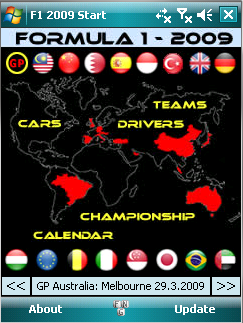
Overview: Formula 1 2009 information straight on your Windows Mobile Pocket PC
Update:
- Fisichella drives for Ferrari now.
- Results: GP Italy.
F1 Includes:
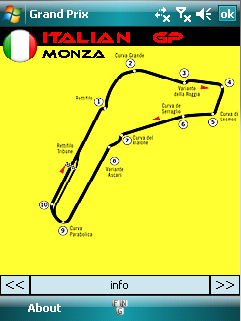
Circuits
-Unique graphics
-Circuit information
Results
-Drivers and Teams
Additional information
-Driverslist
-Teamlist
-Championship
-Driver
-Team
F1 2009 Mobile gives you detailed information about the F1 championship Season 2009. It contains information about the circuits, drivers and teams.
Optimized for portrait mode!
More Info:
http://www.deepweb.nl/

READ MORE AND DOWNLOAD

CyberHorse AutoFlight v6.5 Beta.2 WM2003 WM5 WM6


CyberHorse AutoFlight v6.5.Beta.2
Requirements: WM2003 WM5 WM6
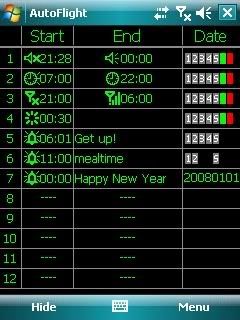
Overview: AutoFlight is a great utility for Windows Mobile PDAs. Firstly, it is a time switch for flight mode on/off, call forwarding, profiles, reset and power off phone.

AutoFlight is a great utility for Windows Mobile PDAs. Firstly, it is a time switch for flight mode on/off, call forwarding, profiles, reset and power off phone. You can replace turning power off/on manually with switching flight mode on/off automatically by Autoflight when you sleep and any other case such as going to theater, lesson, airline, and so on. Or, you can switch profiles at scheduled time automatically to accommodate to special circumstances such as Meeting profile at office, Loud profile on road going to office or back home, and so on. You also can set timed reboot periodically to keep memory clean and system efficient. Secondly, It is a unique mini Big Ben because it is capable of announcing o'clock with voice or chime. Thirdly, it is a time speaker because it is capable of speaking time at any moment by pressing hotkey. You need not see screen to get time in darkness, you can hear of time. Fourthly, it also is an easy used alarm. Now that there is more possibility to use the PDA with 24 hours and 7 days power on constantly because of AutoFlight service, the alarm function of the PDA is more practicability. AutoFlight provides an easy interface to set multiple alarms with different wave sounds and customized title. Last, it can lock keypad automatically and unlock keypad or phone by pressing one key.
Here are some key features of "Autoflight (Pocket PC)":
· Switches flight mode on/off at specified time.
· Turns power off at specified time. (for Smartphone version)
· Call forwarding at specified time.
· Soft resets at specified time.
· For Smartphone version, switches profiles at specified time. For Pocket PC version, switches between normal and silent(mute) only.
· Endues Calendar with functions listed above.
· Reports time
· Reports time hourly
· Reports time immediately by double clicking specified hotkey.
· Sets alarms.
· Runs/Opens a program/document at specified time.


READ MORE AND DOWNLOAD

Systems BrainZap v1.0.3 WM5/WM6


Harmonic Software Systems brainZap v1.0.3
Requirements:Windows Mobile 5.0, 6.0,
Headphones and a quiet environment. Support for PocketPC 2003 SE can be requested.
Overview:Experience altered states of consciousness, from relaxing power sleeps, to deep meditation, enhanced creativity, accelerated learning or intense focus. Simple to use and extremely powerful
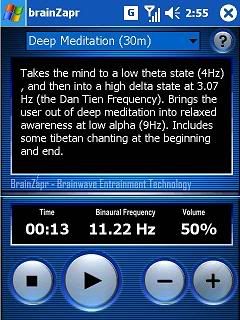
Utilising powerful brainwave entrainment technologies, the brainZapr is able to alter the user’s brainwave patterns, allowing the user to experience different brain states at the touch of a button.
Use it as a meditation tool to unwind after a stressful day, as a learning tool to focus on an important piece of work, or as sleep aid to give you a refreshing power sleep.
The brainZapr has been designed with a simple user interface, just select the preset and press play.
The brainZapr ships with the following presets:
* Accelerated Learning (30m)
* Headache Relief (15m)
* Intense Learning (45m)
* Gentle Focus (15m)
* Gentle Focus (45m)
* Intense Focus (30m)
* Enhanced Creativity (15m)
* Light Meditation (15m)
* Deep Meditation (30m)
* Active Meditation (30m)
* 10 minute Power Sleep
* 30 minute Power Sleep
* 30 minute Silent Sleep
* Earth Resonance (30m)
* Euphoria (5m)
* Chakra Meditation (45m)
New version v1.0.3 with new XML presets and more!
This new version now reads xml files for the presets, allowing you to modify the presets as you wish. All the usual presets are still in there, such as a fifteen minute Headache Relief, Active and Chakra Mediations, a fifteen minute Get to Sleep, a new 30 minute silent sleep, as well as a 45 minute Gentle Focus. Harness the untapped power of your mind with the brainZapr. Utilising powerful brainwave entrainment technologies, the brainZapr is able to alter the user’s brainwave patterns, allowing the user to experience different brain states at the touch of a button.


READ MORE AND DOWNLOAD

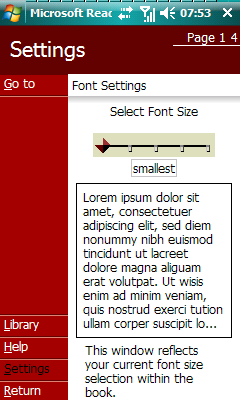
Microsoft Reader v2.4.2 WM2003 WM5 WM6


Microsoft Reader v2.4.2
Requirements:WM2003/WM5/WM6
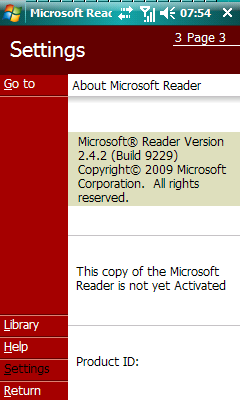
Overview:Microsoft Reader is an software to read ebooks *.lit format
Enjoy the freedom of reading any of the thousands of available Microsoft Reader eBooks on an unmatched variety of devices
With Microsoft Reader for Pocket PC you get:
- Remarkable content support and unmatched portability: Enjoy thousands of Owner Exclusive eBooks on Pocket PC - and take your eReading library with you wherever you go. With Microsoft Reader for Pocket PC you can easily copy books from your desktop/laptop/Tablet PC to your Pocket PC and continue reading wherever you are
- Great on-screen readability: ClearType display technology that makes text on screen crisper and easier to read than ever before. The adjustable font size setting makes it easy to customize your reading experience.
- Dynamic reading: features include highlighting, bookmarking, note taking, and drawing. Plus, you can view your annotations and rename or erase any of them at any time
What's New in this release:
-Update for Windows Mobile 6.0 - Windows Mobile 6.1


READ MORE AND DOWNLOAD

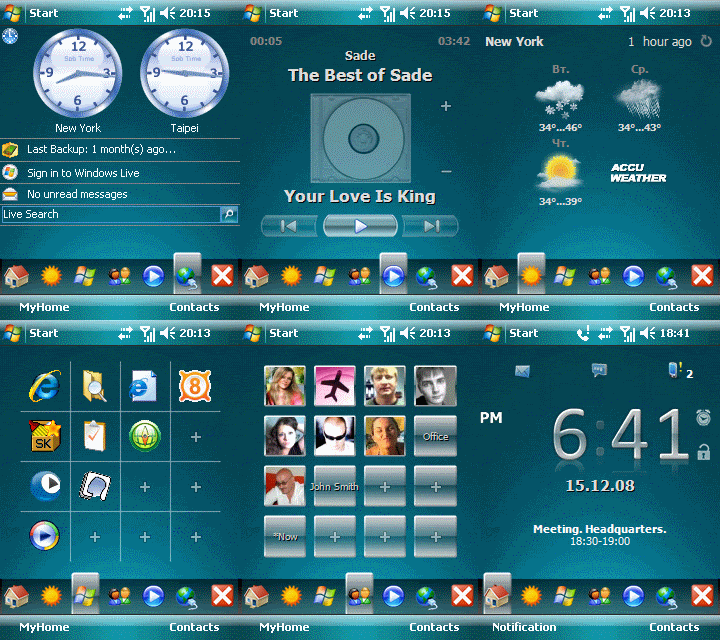
Touch Shell Pro v1.1.0.9


Touch Shell Pro v1.1.0.9
Requirements: Pocket PC with WM 5.0, 6.0 & .NET Compact Framework 2.0
Overview: Touch Shell makes your device more usable than ever and adds rich graphics and fabulous 3D effects to the interface.
Touch Shell is an application offering modern and flexible user interface for Windows Mobile PDAs. The ultimate must-have for all Windows Mobile Pocket PC Phone users, Touch Shell makes your device more usable than ever and adds rich graphics and fabulous 3D effects to the interface. The application features an additional Today screen, which puts all the most frequently used functions at your fingertips.
An advanced version of Touch Shell is also available. It has many additional features:
* Photo contacts page
* Program launcher page
* Weather forecast with animation effects
* Media Player control page
Features:
* 3D visual effects
* Skins support
* Big clock and date
* Missed calls
* Unread messages
* Alarms
* Next appointment
* Separate page for plug-ins
* and more...


READ MORE AND DOWNLOAD

Mobipocket Reader v5.03 (581) S60v3/5

This is v5.03(581) of mobireader while the version available at the official website is v5.03(576). You guys must be wondoring how can this possibly happen ? Well, you can read the whole story here :

What's new in this version ?
1. New "Find" feature inside Options with which you can easily type a word and search for it in the current e-book.
2. Added a short-cut : Pressing 6 quickly allows you to bookmark or unbookmark a page.
Bug : A bug is also reported on some touchscreen devices that the app freezes when switched to fullscreen view . Reinstallation is the only solution as of now.


Quote:Welcome to the most user friendly, versatile, and customizable eBook Reader. Whatever your mobile device, there is a Mobi Reader for it : PalmOs, Windows Mobile, Symbian (Series 60, Series 80, 90, UIQ) and even Blackberry. And if you have a Symbian smartphone, there is a good chance that Mobipocket Reader is already preinstalled!
One Reader, ANY Device : Freedom of Choice
Whatever the choice of your hardware is, you will always find a Mobi Reader for it. Whatever its size or type : your old 90's Palm, the latest and coolest Symbian smartphone, your ultra thin laptop, your old desktop PC and even your Blackberry handhled. And with its generous DRM rights, you won't have to make a choice : you can read your eBooks on up to 4 devices at the same time. For example : your Desktop PC (great for dictionary lookup and annotations), your laptop for your flight travel, your wife's stylish new Palm (for romance eBooks) and your latest Smartphone (for a Star Trek novel)!


READ MORE AND DOWNLOAD

iLauncher v3.0


Control your Pocket PC using the all new iLauncher, packing together the most important set of utilities to better manage your Pocket PC!

iLauncher is an all-in-one application that brings the most powerful utilities that are missing from the Pocket PC operating system to your Pocket PC device in one package. These include: A tab-based launcher Today screen plugin with various information widgets such as battery and memory meters, speed dial shortcuts, screen capture utility and more; A task manager context menu that allows you to track and control the current active applications; A true 'X' button functionality that really shuts-down running applications as opposed to simply minimizing them; A safe-mode protection utility that makes sure your device will always initialize correctly and much more!

- Tab Based Today Screen Plugin:
NEW! - Create special action shortcuts for soft-reset, power-off, screen rotation and more!
NEW! - Create speed-dial shortcuts to initiate phone calls to your selected contacts on phone edition devices
NEW! - Special screenshot utility to easily take screen captures of your Pocket PC screen
A fully customizable tab based Today screen plugin allowing you to create shortcuts to your favorite software titles organized in a tabbed interface
Customize shortcuts order and size. Support both large shortcut icons and small shortcut icons. Optionally add captions to shortcuts with full customization capabilities
Add meters to tabs: Memory, Battery, File Store, SD Card, CF Card and backup battery
All of iLauncher icons support both regular BMP files and TGA files. Display TGA icons with half-transparency levels for a better look on various today themes
Create New action shortcuts to initiate new items based on the device installed software, such as: new message, contact, task, appointment and more
Rearrange, add, remove, and name tabs
Full D-Pad navigation support
Add shortcuts to control panel applets
- NEW! - Task Manager and Real 'X' Close Button
Integrated task manager menu allowing you to close, minimize and activate your current running applications
Full D-Pad navigation support inside the task manager
Special dedicated commands section placed at the bottom of the task manager allowing placement of up to six different shortcuts for easy access on the task manager
Optionally set the 'X' close button to truly close running applications when hitting the 'X' button. By default, applications are only minimized
Define exception applications that won't be included on the task manager list or will be ignored when shutting down all running applications
- NEW! - Safe Mode Protection
Start your device in safe mode to protect your device from corrupted software installation that might lock your device in soft-reset loop
Using the safe-mode utility you can protect your device from corrupted services and save unnecessary hard resets that causes data lose
Easily uninstall corrupted software from your device after starting in safe-mode
Optionally use automatic safe-mode protection to activate safe-mode in case of recursive soft-reset loop
- NEW! - Special Actions and New Shortcuts
Add a special action shortcut for screen-capture. Clicking the shortcut will start iLauncher's screen capture utility to capture your Pocket PC screen
Add speed-dial and SMS shortcuts for specific phone numbers. Available only on Pocket PC with phone capabilities
Special action shortcut for soft-reset, power-off and screen rotation
Add shortcuts to create new items such as: New message, New contact, New task, New appointment and more
- Meters Serial: 530-GDHWBHCC-473
- Top Indicator and Meter
- VGA, Windows Mobile 5 Support and General Features

Size: 3.6 Mb

Download

READ MORE AND DOWNLOAD

Bboy Pocket PC Birthday Software


Size: 84 Kb

Download

READ MORE AND DOWNLOAD

FlashDash Today Screen v1.0


READ MORE AND DOWNLOAD

Pocket Goo (Pocket PC Software)


Have fun with pictures! Edit and alter pictures by simply dragging the stylus across them. Change your friends' and family's appearance completely. Turn a midsize sedan into a sports car! You can save goofy alterations to any picture you load into it. Comes with 4

Size: 470 Kb

Download

READ MORE AND DOWNLOAD

MobileSketch Pro v2.8


EASY INTERFACE MAKES POCKET PC SKETCHING A SNAP
Making a switch in your work style by sketching on a Pocket PC instead of hand-drawing may be intimidating at first, but sketching on your Pocket PC works much the same way as in the office with Apex IV. Take a look at the MobileSketch interface and you will see it's very easy to use so you can immediately take advantage of the time savings and increased accuracy from sketching in the field without learning a
whole new software application.

Just measure in the field with the DISTO™ plus and your measurements are sent wirelessly via Bluetooth® technology to your Pocket PC and our MobileSketch™ Pro software.

Use MobileSketch™ Pro with the DISTO™ plus or use it alone. The reviews are in. You can use these tools separately and you will save time on every report. Imagine the revolution when you use them together.


SYSTEM REQUIREMENTS :

Windows Mobile™ 2003
Bluetooth ® communications if intending to use with DISTO™ plus laser distance meter. The Bluetooth driver must have the ability to communicate through a COM port.

Size: 1.8 Mb

Download

READ MORE AND DOWNLOAD

LoanExpert (Pocket PC Software)


LoanExpert™ is your complete loan and mortgage calculator and analysis tool for Palm OS® handhelds, Pocket PC or Windows Mobile handhelds, and Windows PCs! Calculate interest rate, price, down payment, loan length, and more! Save scenarios for easy loan comparisons.

Feature Highlights:
- PC companion software for convenient calculations on your desktop PC (Plus version).
- Available for Palm OS®,Pocket PC, and Windows Mobile handhelds
- Keep track of multiple loans and mortgages
- Generate amortization tables
- Calculate for any variable quickly
- Calculate interest only loans
- Supports US and Canadian mortgage calculations
- Export information to a memo or note
- Password protection for your security
- Runs on greyscale or color handhelds
- FREE updates and upgrades within the same version number

Size: 5 Mb

Download

READ MORE AND DOWNLOAD

Digital Hair Style (Pocket PC Software)


The Ultimate Hair Stylist application for you. More than 100 hairstyles, unlimited number of hair colors, add any photo available on your pocket PC. Go ahead and surprise yourself.

- More than 100 hairstyles
- Hairstyles range from short, medium, long, fancy and mens hairstyles
- Try different moustaches for a perfect gentleman fit.
- Default comes with 12 color palates.
- Option to create custom color palates.
- Insert your own photos.
- Zoom / resize, move the selected photo and the hair.

Size: 1.5 Mb

Download

READ MORE AND DOWNLOAD

Encyclopedia Concise Britannica 2005 v1.0


The Britannica Concise Encyclopedia provides quick answers to everyday questions about history, art, science, and other fields of human knowledge. A comprehensive collection of knowledge in downloadable format for your PDA, the Britannica Concise Encyclopedia contains 25,000 complete articles.

Size: 1.6 Mb

Download

READ MORE AND DOWNLOAD

Pocket PC Best Software Awards 2006


Size: 4 x 97.6 Mb + 1 x 53.9 Mb

Password: l3onard0d@v1ncitook2daystofinish

Part 1 Download
Part 2 Download
Part 3 Download
Part 4 Download
Part 5 Download


READ MORE AND DOWNLOAD

Spb Pocket Plus v.4.01

Spb Pocket Plus v.4.01

Product Spb Pocket Plus is fully compatible with WM5 and WM6 Windows Mobiles. Get even more pleasure from the enjoyment of the most sold versions for all this time and now won more awards at the podium software.

Spb Pocket Plus one of the most powerful to date, with active Ezhednevnikov zakladkami. Imeyuschayasya button "Close" is now really closes launched the application. Support archives in the explorer simply increases yuzabilnost and simplicity when working with files. Hot keys and new novshevstva allow the user to "attach" special teams, which increases comfort when rabote.Prodvinutye funktsianalnye button in Internet Explorer include support for an entirely new window type and characteristics.
Now Spb Pocket Plus is even more fun to "Safe Mode" to correctly and safely reboot your PKK, if for some reason has failed, or other problems in the system.
Polzutes Spb Pocket Plus now and receive many other useful and improved features not included in the formal renewal Pocket PC in a single product!

READ MORE AND DOWNLOAD

Plugins for Spb Pocket Plus v.4.01

Plugins for Spb Pocket Plus v.4.01


See the difference with the new "ukrashatelnymi" additions to the SPB Pocket Plus 4.01

A set of icons, giving special style and type your pocket computer. The set is presented in three parts, each part includes opredelnny style and design.

Download

READ MORE AND DOWNLOAD
eXTReMe Tracker